
P-Video-Avatar is Pruna AI's talking-head video model. You feed it a single portrait image and either a written script or an audio clip, and it returns a lip-synced video of that face speaking, mouth movements, head motion, and expressions all matched to the speech.
It works just as well on a real photo as it does on an illustrated character or a stylized avatar, which makes it useful well beyond typical corporate "AI presenter" use cases.
Pruna has positioned it as the fastest and most cost-effective option in the avatar-generation category, built on the same optimization work that powers the rest of the P-Video and P-Image family.
MODALITIES
P-Video-Avatar takes two required inputs and turns them into one output:
Image in: a single portrait — photorealistic, illustrated, or stylized.
The model inherits its output aspect ratio from this image, so a landscape (16:9) still produces a horizontal video and a portrait (9:16) still produces a vertical one.
Speech in: either a written voice_script (spoken aloud using one of the built-in voices) or an uploaded audio file.
If both are supplied, the audio file takes priority and the model lip-syncs to it exactly. Video out: an MP4 at 720p or 1080p, with the speech already baked into the audio track.
FEATURES
Built-in text-to-speech: 30 voices (14 female, 16 male) across 10 languages, so you can go from script to finished video without any external TTS tool.
Audio-driven lip sync: upload your own voice recording for exact timing, pronunciation, and performance, and the model will match mouth movement to it precisely.
Full-body control and dynamic backgrounds: not limited to head-and-shoulders talking-head shots. Long-form generation: supports consecutive clips up to around three minutes.
Speed: Pruna P-Video-Avatar generation time of roughly 1.83 seconds per second of video, it is describes as multiple times faster than comparable avatar tools.
HOW TO PROMPT P-VIDEO-AVATAR
Getting good results comes down to two things: the still image and the script.
Start with the portrait. Since P-Video-Avatar animates an existing image rather than generating a scene from scratch, quality starts before the video model ever runs.
A clear, well-lit, front-facing headshot with a plain background produces the most accurate lip-sync and best preserves identity, extreme angles or heavy shadows will drag down quality.
If you don't already have a suitable photo, You can use models like GPT Image 2 or Nano Banana 2 to generate the image.
Using a prompt that specifies demographic, wardrobe, lighting, lens, and framing (for example: "Professional woman in her 30s, medium close-up, office window light, single subject, 9:16").
Match the aspect ratio of that still to whatever orientation you want the final clip in 16:9 for a website hero video, 9:16 for social.
Then write the script to be spoken, not read. Keep sentences short, use deliberate punctuation to control pacing, and set the voice language to match your script so pronunciation doesn't break.
A Speaking Style field lets you nudge delivery, tone, pacing, emotion, separately from the words themselves, and keeping the video prompt simple with a fixed camera gives the tightest lip sync.
If you're localizing the same message into multiple languages, keep the portrait identical and only swap the script and language setting.
TOP 5 USE CASES FOR P-VIDEO-AVATAR
AI presenters and spokesperson content. Deliver a message on camera without booking a studio, actor, or crew — ideal for product announcements or company updates.
Marketing and UGC-style ad variations. Generate multiple avatar-led ad cuts quickly to test different messages, voices, or looks at scale.
Multilingual localization. Keep one portrait and swap the script and language to produce the same message in 10 languages without reshooting.
Product demos and explainer videos. Pair a talking avatar with a walkthrough script for onboarding, tutorials, or customer education.
Virtual influencers and game/NPC dialogue. Because it works equally well on illustrated and stylized characters, it's a natural fit for animating game characters, virtual hosts, or branded mascots.
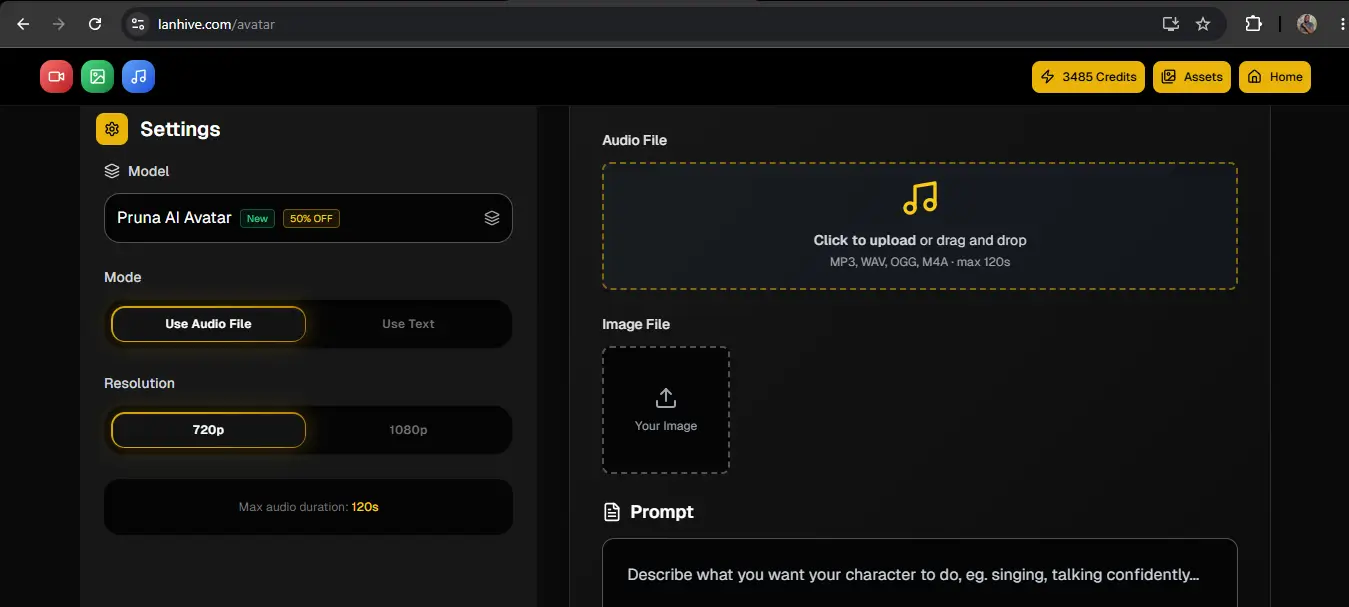
HOW TO USE P-VIDEO-AVATAR ON LANHIVE
Once you login, click Avatar on the video section of the home page.
Choose Pruna AI Avatar from the models.
Then choose the Mode (Audio File or Text).
Upload your portraid image and your audio (if mode is Audio File).
Type your prompt and click Generate.
Here is a video with examples on using P-Video-Avatar - P-Video-Avatar Video
Ready to tell your stories with AI?
No better time to start than now